

School Photo Ordering Guide
Hersey Photography
School Photos Made Simple
Need help finding or ordering your child's school photos? You're in the right place! This guide will walk you through accessing your photos, choosing from our new background options, and placing your order.
Already know part of the process? Jump straight to the instructions you need!
Your student's school ID number is your photo access code.
STEP 1: FIND YOUR STUDENT'S ACCESS CODE
You can find this number in your ParentVUE account. Whether you're using the mobile app or a computer, your student's ID appears directly beneath their name on the home screen.
ParentVUE App

ParentVUE Website

STEP 2: ACCESS YOUR SCHOOL PHOTOS
Ready to See Your Photos?
Now that you have your student's ID number, you're ready to access their school photo gallery!
-
Visit hersey-photo.gotphoto.com/login or click the View & Order School Photos button at the top of this page.
-
Enter your student's ID number in the access code box.
-
If this is your first visit, you may see a message that your photos are ready asking for your email address. You can enter your email or click the X in the upper-right corner to skip.
-
Click Shop Now for the student whose photos you want to view.
Have more than one student?
You can enter multiple student access codes to access their galleries. Simply select Shop Now for the student you'd like to order photos for.
Ready to Order? Choose What You Need:
STEP 3: CHOOSE YOUR PHOTOS & BACKGROUNDS
Your Photos, Your Style!
Once you've entered your student's gallery, you'll see their available portraits with the original standard background. You may also see a photo with school lockers behind your student if their class photo has been uploaded.
Want something different? Hersey Photography now offers twelve additional background options, giving you more ways to personalize your school photos!
How to Choose a New Background
-
Click the portrait you'd like to order.
-
To explore additional backgrounds, select the portrait featuring the locker background.
-
You'll be taken to a screen where you can preview the available background choices beneath your student's photo.
-
Click your preferred background to see how it looks with your student's portrait.
-
Once you've found your favorite, you're ready to select your prints or digital downloads!
Good to Know: You can also change your background later when editing individual prints or downloads.
EXPLORE OUR 12 NEW BACKGROUNDS!

Autumn Waterfall

Football

Window Light

Waterfall

Holiday Greetings

Golden Grove

Autumn Trail

Lockers

Rainbow Wood

Classic Blue

Teal
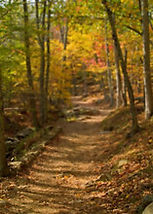
Forrest Trail
The original standard school portrait background is still available. Background previews are examples; your student's portrait will appear with your selected background when ordering.
STEP 4: ORDER INDIVIDUAL PRINTS & DIGITAL DOWNLOADS
Just Need a Few Photos?
Whether you're looking for a print to frame, pictures to share with family, or a digital image to keep, you can purchase individual items without ordering an entire package!
Choose Your Photo Products
-
Click the portrait you'd like to purchase.
-
On the right side of the screen, you'll see the ordering categories: Popular, Prints, and Downloads.
-
Select Prints to choose a 4×6, 5×7, or 8×10 print, Select Magnets : 4x5 or Magnets: Wallets, or select Photo Download to purchase a digital image.
-
-
Choose your desired product and click Select and Edit.
-
Adjust the cropping if necessary. You can also change your background by selecting Background, located near the cropping option.
-
Once you're satisfied with your photo, click Add to Cart.
Want More Than One Photo?
After adding an item to your cart, you'll return to the product selection screen. You can continue shopping and add additional prints or downloads before checking out.
Looking for a photo package instead? → View Package Instructions
STEP 5: ORDER PHOTO PACKAGES
More Photos, More Memories!
Looking for a collection of school photos? Hersey Photography offers three package options: Mini, Basic, and Deluxe.
Follow these steps to select your package, customize your backgrounds, and add everything to your cart.
Choose Your Package:
-
From the main photo ordering screen, click Packages in the upper-left corner.
-
Browse the Mini, Basic, and Deluxe packages.
-
Click View Package on the package you'd like to purchase.
-
Beneath your student's picture, click Choose Pose for All.
-
Select either the original standard-background portrait or the blank-background portrait (typically the last photo available). Click Confirm.
Customize Your Background:
-
You'll now see previews of all the items included in your package.
-
To customize an item, click Choose Background beneath that item.
-
Select your preferred background and click Confirm.
-
Repeat steps 7–8 for each item you'd like to customize.
-
Once you're satisfied with your selections, click Add to Cart on the left side of the screen.
IMPORTANT: BACKGROUND SELECTION
Backgrounds must be selected individually for each item in your package.
Choosing a background for one print does not automatically change the backgrounds on the other prints.
You can use the same background for every item or mix and match your favorites!
Want to Order More?
You can add additional prints, digital downloads, or another package before checking out.
When you're ready, click the shopping cart icon in the upper-right corner.
Ready to Complete Your Order?
STEP 6: CHECKOUT, SHIPPING & DELIVERY
Almost Done! Let's Complete Your Order.
You've selected your favorite photos, customized your backgrounds, and added everything to your cart. Now it's time to complete your purchase!
Review Your Cart
-
Click the shopping cart icon in the upper-right corner of the ordering website.
-
Review the items in your cart. Make sure you've selected the correct photos, backgrounds, sizes, and quantities.
-
Once everything looks correct, click Proceed to Checkout on the right side of the screen.
Choose Your Delivery Method
You'll have two shipping options at checkout:
Option 1: Studio Delivery
Select Shipping to Studio at checkout.
Your order will be shipped to Hersey Photography at no additional shipping charge.
We distribute school photo orders to participating schools on scheduled delivery dates. Studio pickup may also be arranged by appointment.
Option 2: Home Delivery
Select Home Delivery to have your order shipped directly to your home or another address.
-
Additional shipping fee: $6
-
You can enter a different shipping address if you're sending photos to family or friends.
-
If you select a different address, additional fields will appear for you to enter the recipient's shipping information.
Enter Your Information
-
If this is your first order, complete the New Customer information.
-
If you've ordered before, you can select Email Login.
-
If you selected home delivery, verify your shipping address.
-
Click Next Step to continue.
Complete Your Purchase
-
Enter your payment information.
-
Continue to the order overview.
-
Carefully review your order details, including products, backgrounds, delivery method, and total cost.
-
Complete your order using the final confirmation button.
School photo orders are delivered to participating schools on scheduled delivery dates.
After our final scheduled school delivery, families may choose home delivery or arrange studio pickup by appointment.
Home delivery is available for an additional $6 shipping fee.
IMPORTANT: DELIVERY INFORMATION
Questions about your order or delivery? Email jolynne@herseyphoto.com.
WE'RE HERE TO HELP!
Already Ordered? Want a Different Background?
Have you already purchased your school photos but would like to take advantage of our twelve new background options?
We haven't forgotten about you!
We want every family to be happy with their school photos. If you've already placed an order and would like to explore a different background, please contact us. We'll be happy to help you with your options!
Questions or Having Trouble Ordering?
Whether you're having difficulty finding your student's ID, accessing your photo gallery, selecting backgrounds, or completing your purchase, we're here to help!
Please don't hesitate to reach out with any questions or concerns.
Thank you for choosing Hersey Photography! We appreciate the opportunity to capture your student's school memories.
Elementary School Photo Retakes
Retake sessions are scheduled for November 4 for T or C Elementary School and November 5 for Sierra Elementary Complex.
Retakes for our other participating schools have already taken place.